 Radmard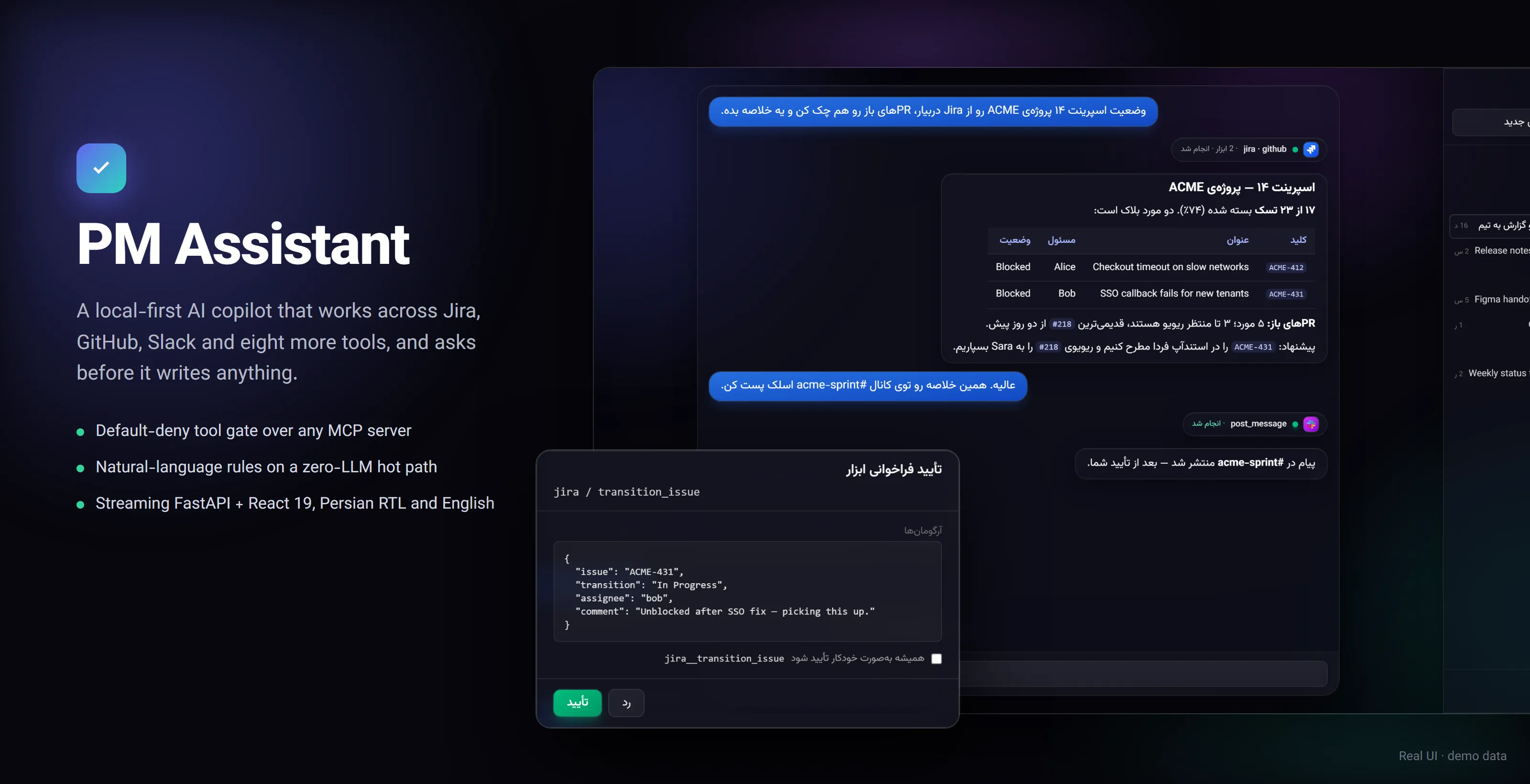
A local-first AI copilot for project managers: it reads and acts across Jira, GitHub, Slack and eight more tools, and every write waits for your click.
PM Assistant is an open-source desktop-style web app you run on your own machine. It streams responses from any model on OpenRouter, routes tool calls through Smithery Connect (a hosted MCP gateway that handles third-party OAuth), and persists everything to a local SQLite file. There is no multi-tenant cloud, no shared backend, no telemetry. The agent loop is reactive (chat-driven) and proactive (natural-language rules that poll on a schedule). A built-in Telegram bridge lets you talk to the same agent from your phone.
Highlights
- Approval-gated agent loop. Reads run immediately; any write pauses the stream mid-turn and shows an approve/reject card (in the browser or on Telegram).
- Default-deny tool policy. Tools from arbitrary MCP servers are classified by verb tokens; anything unknown is treated as a write.
- Rules that run while you sleep. One LLM call compiles a plain-English trigger into a typed spec; the scheduler then polls with zero LLM calls until something matches.
- Bilingual, RTL-first UI. Persian (right-to-left) and English, glass UI on a dark aurora background, and a phone layout with a slide-in menu.
- Tested. 289 backend pytest tests (LLM and Smithery mocked) and 55 vitest frontend tests, both run in CI.
Screenshots
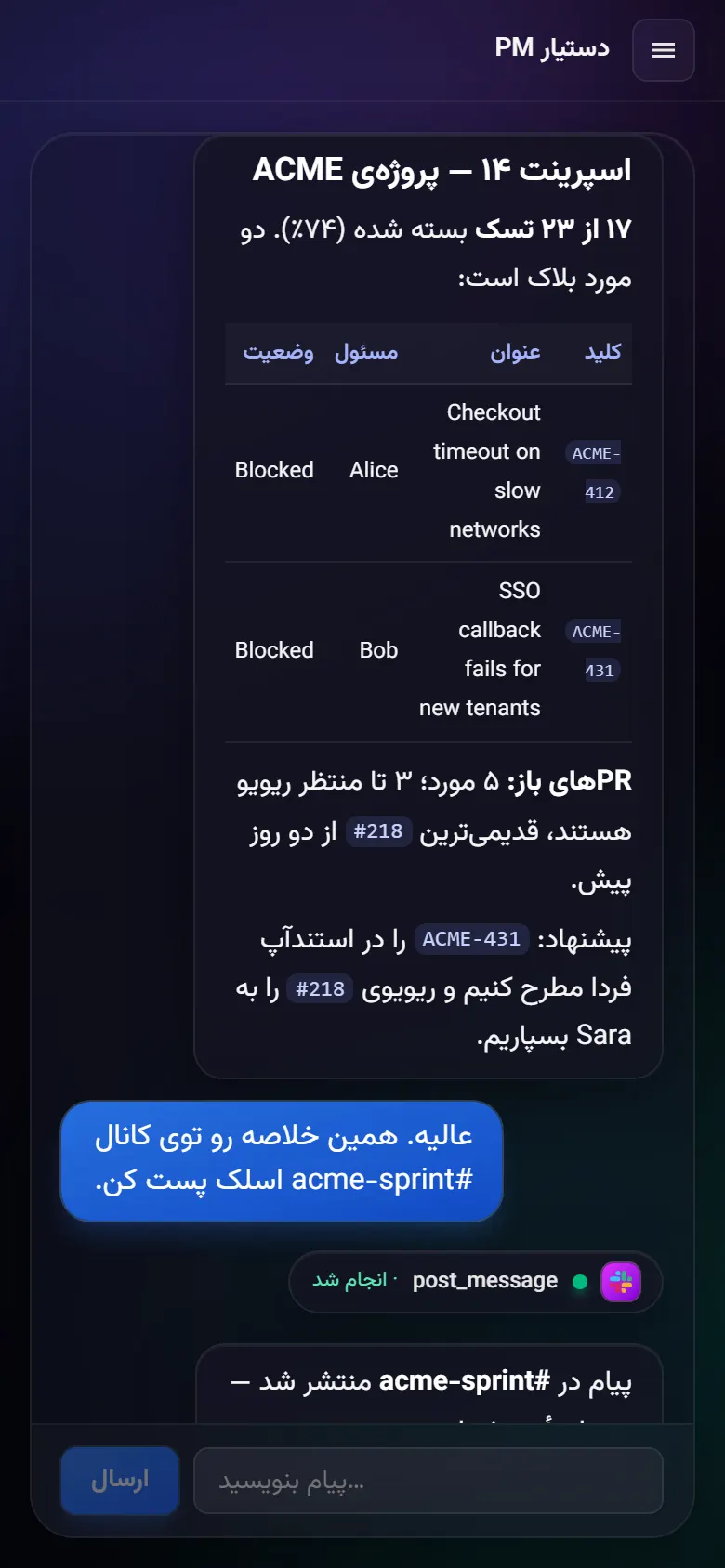
All screenshots show the real UI running against a seeded SQLite file with invented data (Acme Corp, Alice, Bob). No LLM or Smithery call was made; the approval card is driven by a mocked SSE turn.
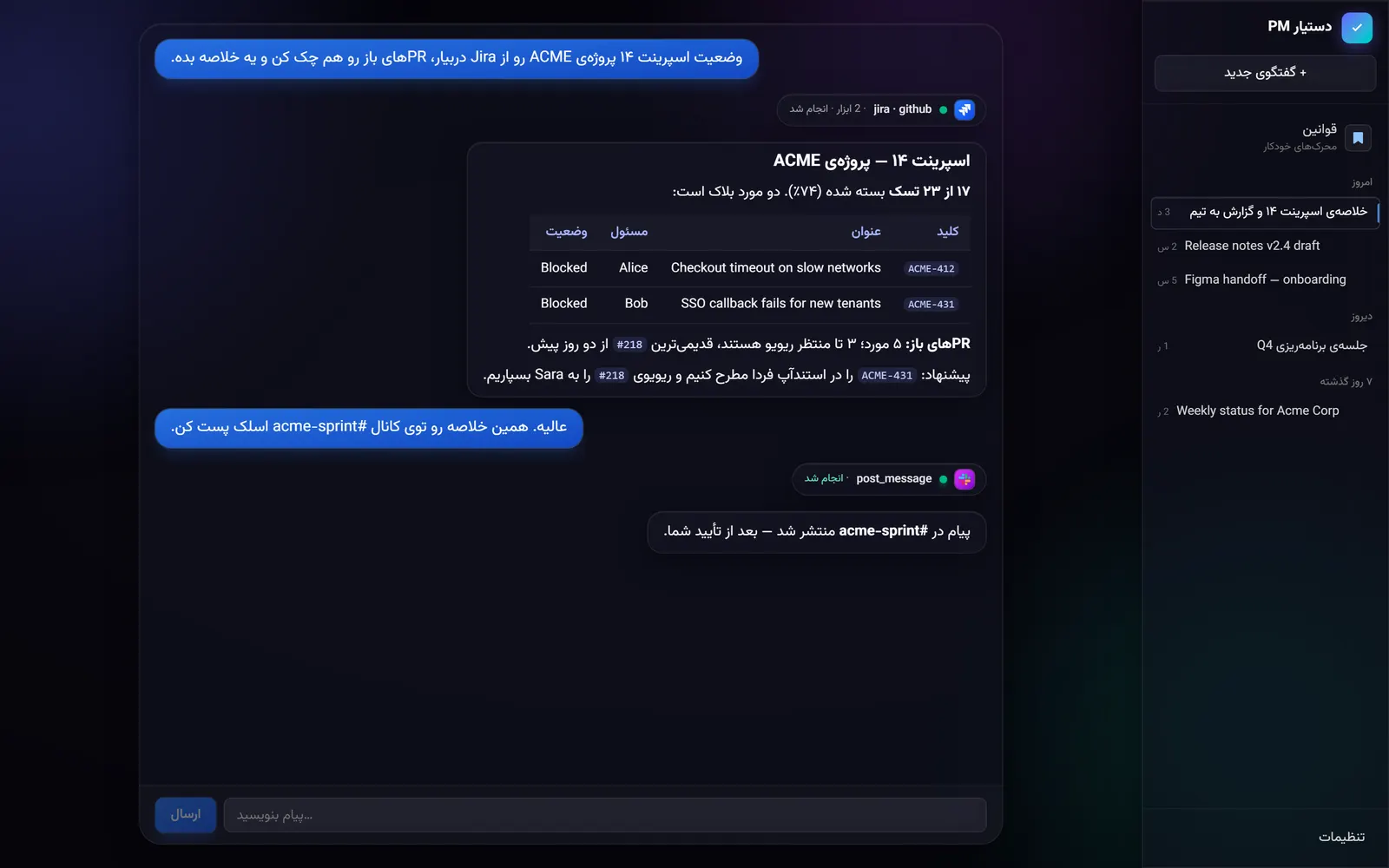 | 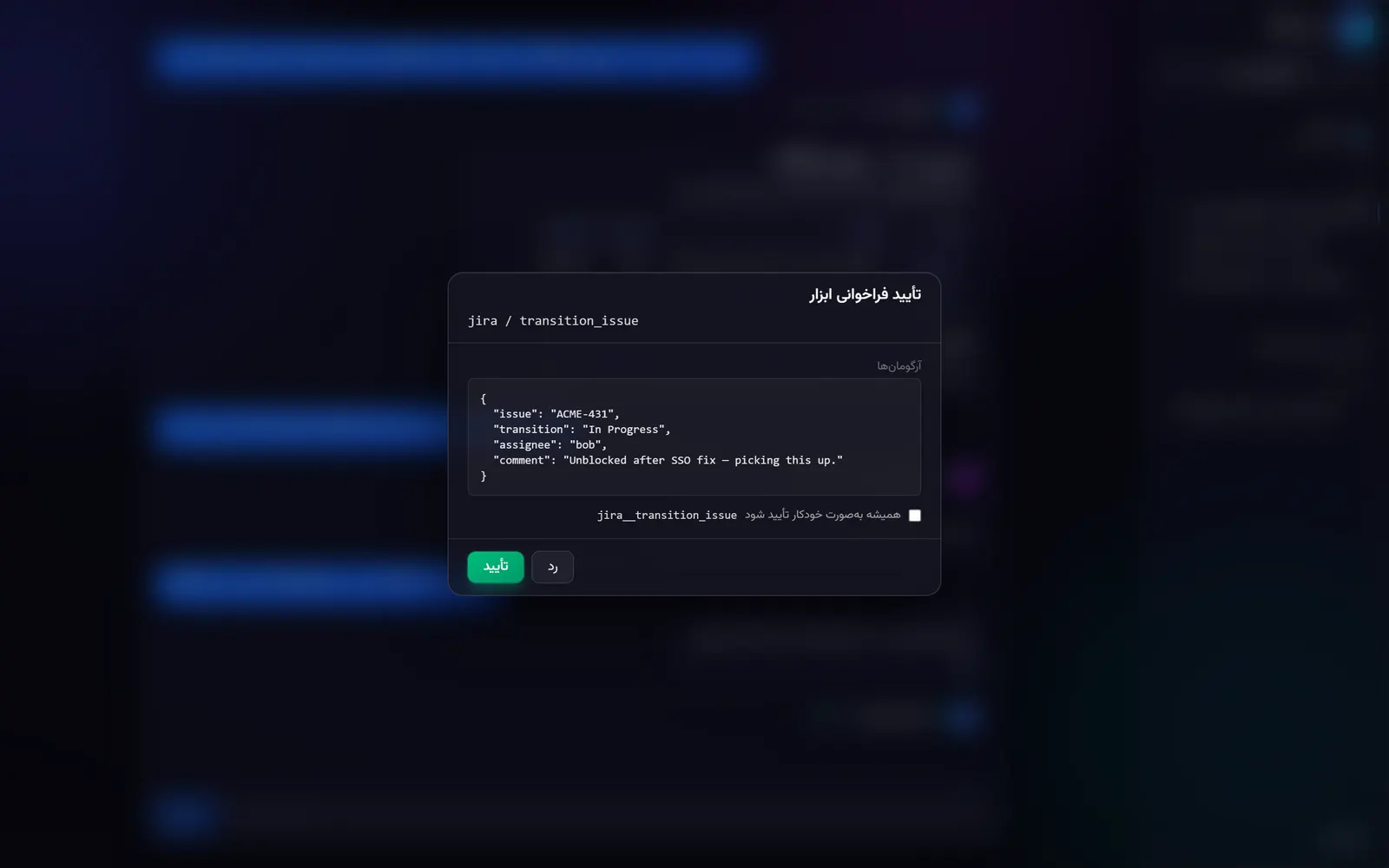 |
| Chat (Persian, RTL). Two read tools grouped into one card, then a markdown summary. Demo data. | Approval gate. A write tool (jira__transition_issue) paused mid-stream with its arguments. Demo data. |
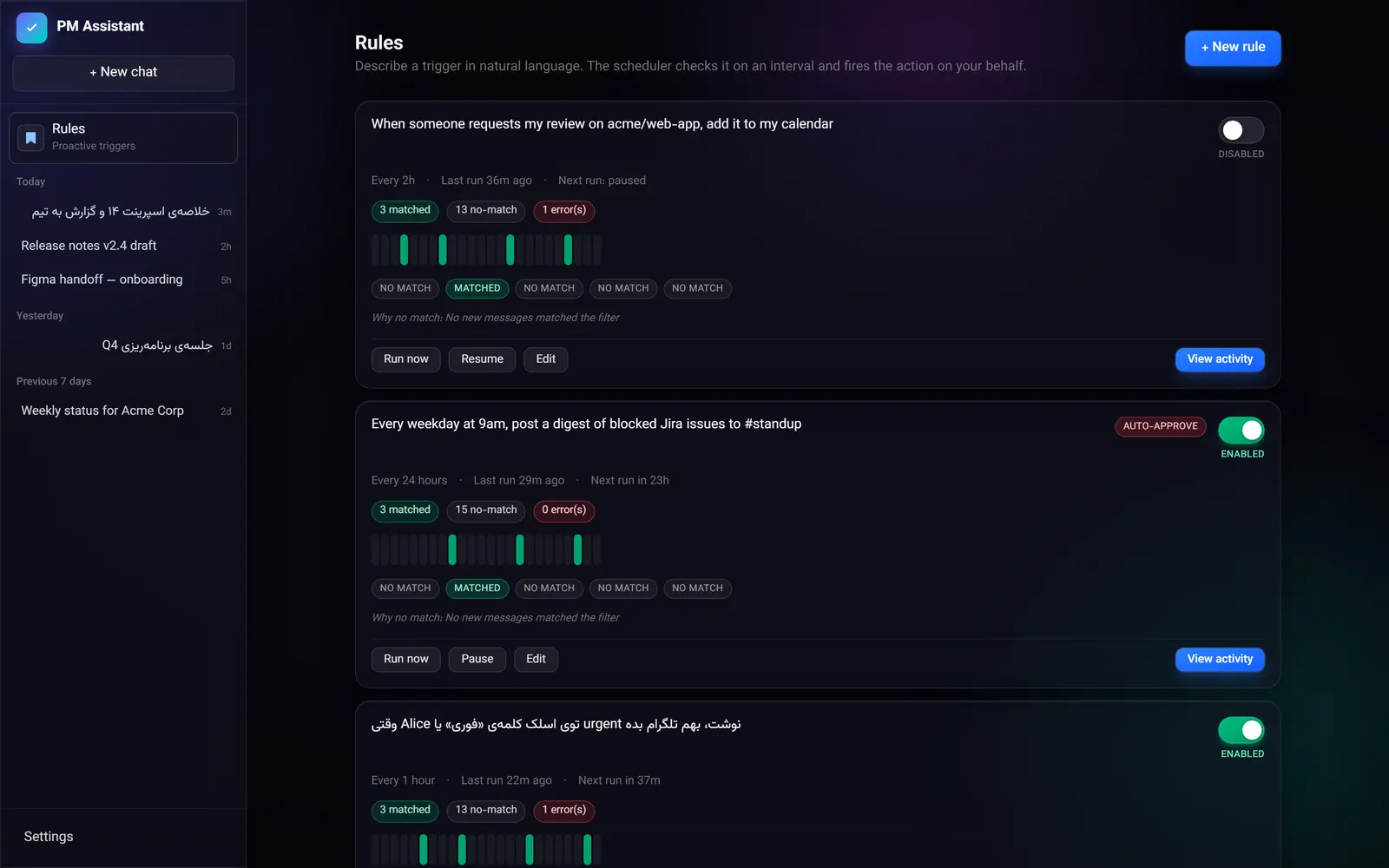 | 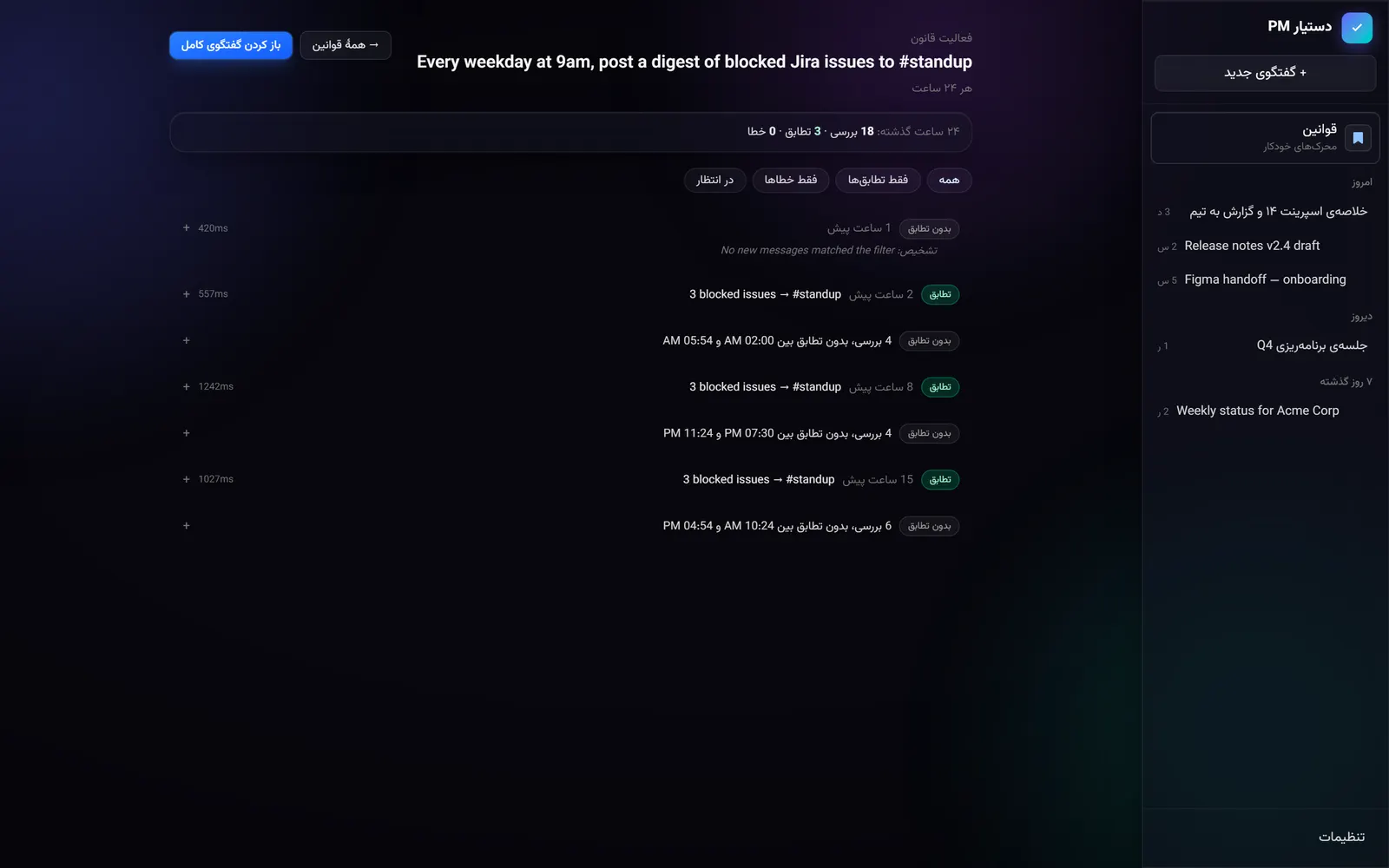 |
| Rules. Natural-language triggers with poll history and match counts. Demo data. | Rule activity. Every poll, with no-match runs collapsed into one row. Demo data. |
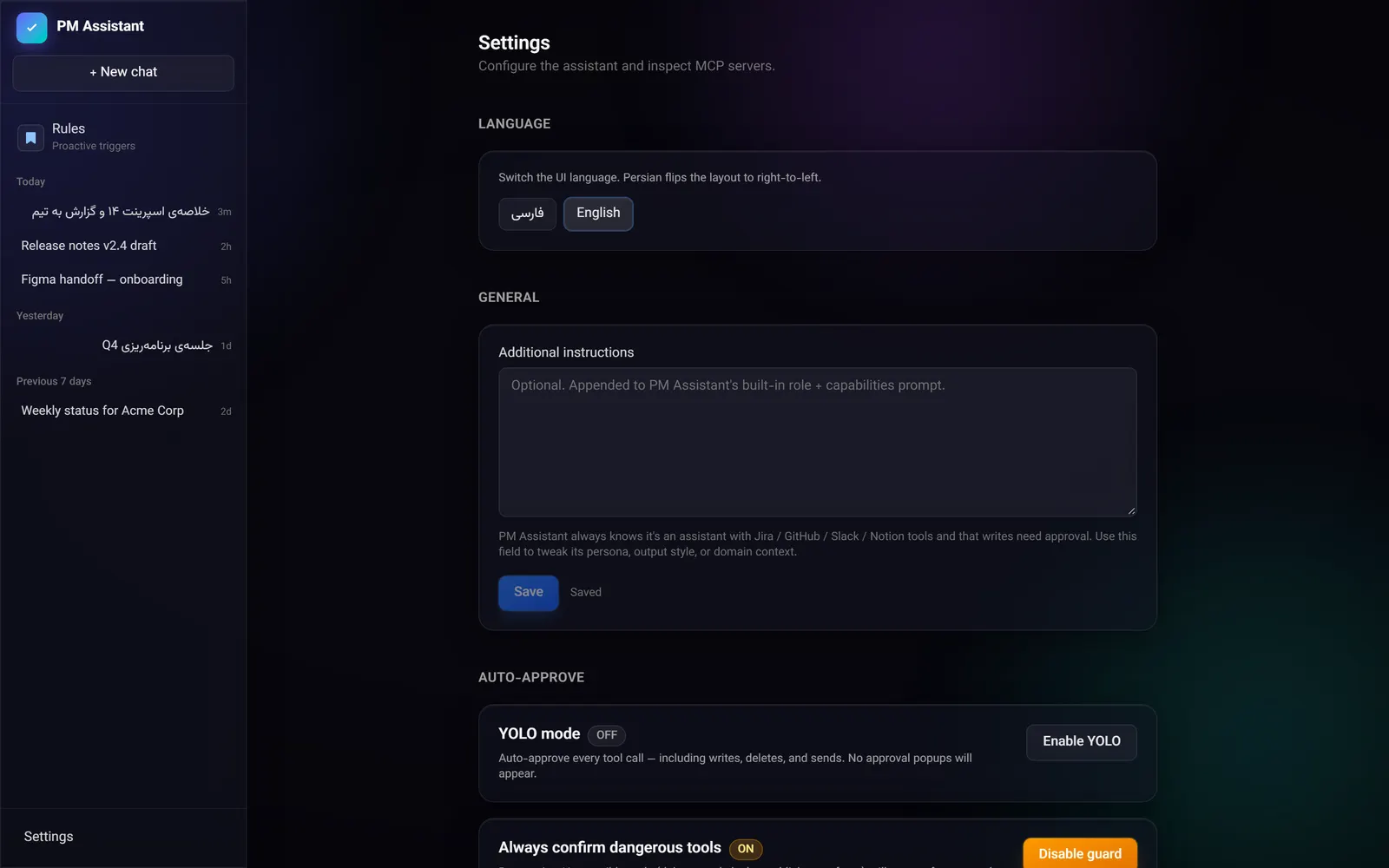 |  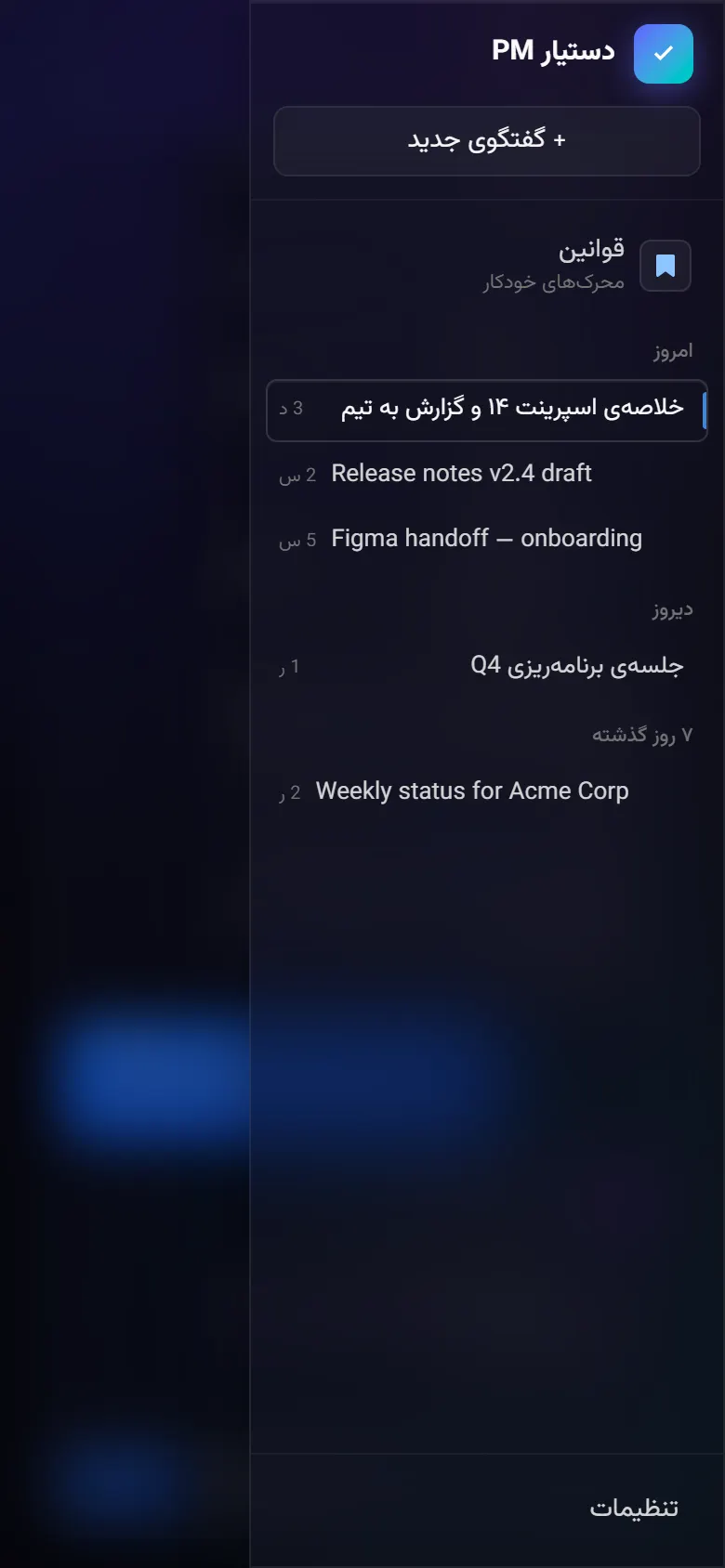 |
| Settings. Language, extra instructions, YOLO mode and the dangerous-tool guard. | Phone layout. The sidebar becomes a slide-in menu. Demo data. |
Why it’s interesting
- Default-deny tool gate. Tools come from arbitrary MCP servers, so the agent cannot know which are safe.
backend/agent/policies.pyclassifies tools by verb tokens and treats anything unrecognised, or with a write verb hidden after a read prefix, as a write that needs approval. - Approval-gated agent loop.
backend/agent/loop.pystreams the model, reassembles tool-call fragments, and pauses the same in-memory session mid-turn until an approve/reject arrives over HTTP (or Telegram). - Natural language to typed rules.
backend/services/rule_compiler.pyturns a sentence into a validatedCompiledSpecwith one LLM call in JSON mode, retrying once with the parser error fed back. After that the scheduler runs with zero LLM calls until a filter matches. - Hosted OAuth via MCP. Third-party tokens never touch this backend; it talks JSON-RPC to Smithery Connect.
- Tested. Backend pytest suite (LLM and Smithery mocked), vitest frontend tests, and CI that runs both.
Features
- 11 first-party integrations out of the box — Jira, GitHub, Slack, Notion, Linear, Gmail, Google Calendar, Google Sheets, Outlook, Figma, Confluence. Add or remove servers by editing
backend/integrations.json; any MCP server published on Smithery works. - Approval-gated tool calls — every write is paused mid-stream and surfaced as a card you accept or reject. Reads auto-dispatch.
- Default-deny tool gate — verb-token classifier in
backend/agent/policies.py(75 write tokens, 42 read tokens). New integrations inherit the policy with zero config. - YOLO mode — opt-in toggle that auto-approves every tool call for the session. Off by default.
- Proactive rules engine — describe a trigger in plain English (“ping me on Slack when my GitHub PR gets a review request”). An OpenRouter call compiles it to a typed spec, APScheduler polls the source tool on an interval (≥ 60 s), matches stream into a pinned Rules activity chat. Hot path is LLM-free.
- Telegram bridge — long-poll client mirrors a private Telegram chat into the agent. Approve writes from your phone.
- Glassmorphic UI — animated aurora background, frosted panels, centered chat island, responsive down to phone width.
- Streaming SSE everything — token-by-token model output, tool-call lifecycle events, all over a single channel.
- Tool grouping — chained tool calls collapse into a single expandable group card so the timeline stays readable.
- Smooth pending → success transitions — the same card cross-fades from amber to emerald when a tool finishes, no flicker.
- Local-first persistence — async SQLite via SQLModel; chats, settings, rules, firings all live in
backend/data/pm.db. Smithery owns third-party tokens.
Architecture
┌──────────────────────────────────────────────────────────────────────┐
│                         Browser (localhost:5173)                     │
│  React 19 · Vite 8 · Tailwind v4 · Zustand · TanStack Query 5        │
│                                                                      │
│  ChatView ──── SSE ─────┐                                            │
│  ToolApproval ─ POST ──┐│                                            │
│  Integrations ─ POST ──┘│                                            │
└─────────────────────────┼────────────────────────────────────────────┘
                          │ /api  /sse   (Vite proxy)
┌─────────────────────────▼────────────────────────────────────────────┐
│                    FastAPI backend (localhost:8000)                  │
│                                                                      │
│  ┌──────────────┐    ┌────────────────┐    ┌─────────────────────┐   │
│  │ AgentSession │───▶│  MCPManager    │───▶│ Smithery Connect    │   │
│  │  (loop.py)   │    │  + builtins    │    │ (server-side OAuth) │   │
│  └──────┬───────┘    └────────────────┘    └─────────────────────┘   │
│         │                                                            │
│         ▼                                                            │
│  ┌──────────────┐    ┌────────────────┐    ┌─────────────────────┐   │
│  │  OpenRouter  │    │  APScheduler   │    │  Telegram bridge    │   │
│  │  (streaming) │    │  rule_engine   │    │  (long-poll)        │   │
│  └──────────────┘    └────────────────┘    └─────────────────────┘   │
│                                                                      │
│                     SQLModel  ──▶  data/pm.db                        │
└──────────────────────────────────────────────────────────────────────┘
The control plane lives in agent/loop.py: stream OpenRouter → assemble tool-call fragments → consult agent/policies.py → either dispatch immediately (read) or pause and emit tool_call_request (write). Approval comes back through POST /api/chats/{chat_id}/approve, which resumes the same in-memory AgentSession. Every Smithery call is plain JSON-RPC over httpx; backend never sees a Jira/Slack/Google token.
Quick start
Prerequisites
| Tool | Version |
|---|---|
| Python | 3.13 |
uv | 0.5+ |
| Node | 20+ |
pnpm | 9+ |
| OpenRouter API key | https://openrouter.ai/keys |
| Smithery API key | https://smithery.ai → Account → API Keys |
Install
git clone https://github.com/<your-user>/pm-assistant.git
cd pm-assistant

cp .env.example .env
# edit .env, set OPENROUTER_API_KEY and SMITHERY_API_KEY

cd backend  && uv sync   && cd ..
cd frontend && pnpm install && cd ..
Run (two terminals)
# Terminal 1 — backend on :8000
cd backend
uv run uvicorn main:app --reload --port 8000
# Terminal 2 — frontend on :5173 (proxies /api and /sse to :8000)
cd frontend
pnpm devOpen http://localhost:5173. First boot creates backend/data/pm.db automatically.
Demo mode (no API keys)
To browse the UI with invented data (no OpenRouter or Smithery account needed):
cd backend
DATABASE_URL=sqlite+aiosqlite:///./data/demo.db OPENROUTER_API_KEY=demo uv run python ../scripts/seed_demo.py
DATABASE_URL=sqlite+aiosqlite:///./data/demo.db OPENROUTER_API_KEY=demo uv run uvicorn main:app --port 8000
Chats, rules and rule activity render from the seed; sending a message needs a real key. scripts/capture-screenshots.cjs regenerates the images in docs/images/ from a running demo instance (needs Playwright on NODE_PATH).
Environment variables
| Variable | Required | Default | Notes |
|---|---|---|---|
OPENROUTER_API_KEY | yes | — | Used for chat completions and rule compilation. |
SMITHERY_API_KEY | for integrations | empty | Bearer token for api.smithery.ai. The app boots without it, but no tool can connect. |
OPENROUTER_DEFAULT_MODEL | no | google/gemini-3-flash-preview | Override per-chat in Settings. |
SMITHERY_NAMESPACE | no | pm-assistant | Logical namespace for connections. |
DATABASE_URL | no | sqlite+aiosqlite:///./data/pm.db | Anything SQLModel-async-compatible. |
SMITHERY_API_BASE | no | https://api.smithery.ai | For self-hosted Smithery. |
TELEGRAM_BOT_TOKEN | no | — | Enables the Telegram bridge. |
.env lives at the repo root, not under backend/. backend/config.py loads ../.env explicitly.
Configuring integrations
Smithery Connect handles OAuth for every third-party service so this codebase never touches a Jira/Google/Slack token.
- Open Settings → Integrations.
- Click Connect on the row you want.
- A popup opens to Smithery, which redirects to the upstream service for OAuth.
- After you authorize, the popup closes; the row flips to Connected within ~2 s (frontend polls
POST /api/integrations/{name}/refresh). - The agent’s system prompt is rebuilt on the next message — its capability table now includes that integration’s tools.
Click Disconnect to revoke. Smithery deletes the encrypted refresh token; tools disappear from the next agent turn.
Adding a new integration
Edit backend/integrations.json:
{
  "linear": {
    "label": "Linear",
    "mcpUrl": "https://server.smithery.ai/linear/mcp"
  }
}
Restart the backend. The new row appears in Settings → Integrations. The MCP URL must be the canonical one shown on that server’s Smithery page.
Proactive rules
Rules let the agent do work while you sleep.
You: every weekday at 9am, summarize unread Slack DMs from my team and post the digest
     into #standup
The flow:
- Compile — one OpenRouter call with
response_format=json_objectproduces a typedCompiledSpec(source tool, filter, action prompt). Retries once on parse failure, then surfaces the error in the UI. - Schedule —
APScheduler(AsyncIOScheduler,max_instances=1, default 5-minute interval) polls. The hot path is zero LLM calls when nothing matches — only the source tool runs. - Match — when the filter fires, an
AgentSessionruns against the pinned Rules activity chat, seeded with[rule trigger] <action_prompt>. Context: <summary>. - Approve —
auto_approve=Truerules run in YOLO mode; otherwise the same approval modal appears in the activity chat. - Self-heal — five consecutive failures auto-disables the rule and stamps
last_errorfor inspection.
Create rules from /rules (manual two-step editor) or from chat (rules__create_rule builtin tool — the LLM is instructed to detect “whenever / every / if someone…” intents and ask you for interval + auto-approve before calling).
Supported filter kinds: message_from_user_contains, new_issue_mentions, new_pr_review_request, schedule_only. Adding a new kind is a five-step recipe: add the literal to FilterKind in backend/services/rule_compiler.py, add a required-field rule in _validate_filter_invariants, add a matcher in rule_engine.py, extend _FILTER_GUIDE so the LLM knows the kind, and add tests to test_rule_compiler.py and test_rule_engine.py.
Telegram bridge
Set TELEGRAM_BOT_TOKEN in .env, restart, then enable the gateway under Settings → Telegram gateway and generate a pairing code. Send /pair <code> to the bot; that binds it to your chat, and messages from any other chat are ignored. A long-poll client subscribes to the bot’s updates; messages from the paired chat are mirrored into a dedicated chat in the UI and run through the same agent loop. The bot replies on the same Telegram thread once the turn finishes — including any approval prompts (you tap a button on Telegram to approve).
This makes the assistant reachable from your phone without exposing the FastAPI server to the public internet.
Settings
Open the gear icon. Everything here is persisted to UserSetting rows in SQLite.
| Setting | Effect |
|---|---|
| Model | Any OpenRouter model ID. Falls back to OPENROUTER_DEFAULT_MODEL. |
| YOLO mode | Auto-approve every tool call. Use sparingly. |
| Auto-approve tools | Per-tool allowlist for finer-grained YOLO. |
| Show tool details | Expand tool args/results inline by default. |
| Additional instructions | Free-form text appended to the system prompt under ## Additional instructions. Not a system-prompt override. |
Mutating settings drops the in-memory AgentSession so the next message rebuilds the system prompt with new flags.
Tech stack
| Layer | Tech |
|---|---|
| Frontend framework | React 19, Vite 8, TypeScript |
| Styling | Tailwind v4 (via @tailwindcss/vite, no config file); English and Persian UI strings in src/i18n/ |
| Frontend state | Zustand (src/store.ts) + TanStack Query 5 |
| Backend framework | FastAPI, Python 3.13, async throughout |
| ORM / DB | SQLModel + aiosqlite |
| LLM client | openai SDK pointed at OpenRouter |
| MCP transport | httpx.AsyncClient against Smithery Connect (Streamable HTTP JSON-RPC) |
| Scheduler | APScheduler (AsyncIOScheduler) |
| Tests | pytest + respx (backend), vitest + jsdom (frontend) |
| Package managers | uv (Python), pnpm (Node) |
Project structure
project-manager/
├── backend/              FastAPI app
│   ├── agent/            AgentSession loop, policies, system prompt assembly
│   ├── api/              HTTP routers: chats, settings, integrations, rules, sse
│   ├── db/               SQLModel models, async session, migration patches
│   ├── services/         rule_compiler, rule_engine, rule_scheduler, rule_tool
│   ├── integrations/     telegram/ (bot, pairing, bridge to the agent loop)
│   ├── integrations.json Declarative list of Smithery MCP servers
│   ├── smithery_client.py Thin httpx wrapper for Smithery Connect
│   ├── data/             SQLite file lives here (gitignored)
│   ├── tests/            pytest tests
│   └── main.py           FastAPI lifespan: scheduler, builtin tool register, telegram start
├── frontend/             Vite app
│   ├── src/
│   │   ├── components/   ChatView, MessageList, Composer, ToolApproval, RuleEditor, Sidebar
│   │   ├── lib/          stream.ts (SSE parser), api.ts
│   │   ├── store.ts      Zustand store — chats, approvals, settings
│   │   ├── tests/        vitest tests (more sit next to their components as *.test.tsx)
│   │   └── index.css     Tailwind v4 @theme tokens, glass utilities, aurora animation
├── docs/images/          Screenshots referenced from this README
├── scripts/              seed_demo.py (fictional demo DB), capture-screenshots.cjs
├── .env.example          Template — copy to .env and fill in keys
└── CHANGELOG.md          Release notes
Tests
cd backend  && uv run pytest -v          # backend
cd frontend && pnpm test                  # frontend (vitest)

# single test
cd backend  && uv run pytest tests/test_agent_loop.py::test_turn_with_write_tool_requires_approval -v

# lint / typecheck
cd frontend && pnpm lint
cd frontend && pnpm build                 # tsc -b && vite build
asyncio_mode = "auto" is set in pyproject.toml, so async def test_… runs without the @pytest.mark.asyncio decorator. Smithery is fully mocked via respx; tests never hit the network.
Security model
- Default-deny tool gate.
agent/policies.pytreats every tool as write-class unless its verb is on the read-token allowlist AND none of its segments are write tokens. Unknown tools are gated. The agent cannot bypass approval by inventing a tool name or burying a write verb after a read prefix. - Smithery error-body redaction.
Bearer <token>,setupUrl=…, and credential-shaped substrings are stripped from upstream error bodies before they land inlast_error,RuleFiring.error, or any SSEerrorevent. - No third-party tokens locally. Jira / GitHub / Slack / Notion / Google / Outlook / Linear / Figma / Confluence credentials live encrypted at Smithery. Disconnecting from the UI revokes them upstream.
- Single-user assumption. There is no auth in front of the FastAPI server. Bind to
127.0.0.1(the default) or put it behind a reverse proxy you control. Do not expose:8000to the internet. - Telegram callback authorization. Every approve/reject callback validates
from.id == chat.id == bound_chat_idbefore mutating the gate. - Rule auto-disable. Five consecutive errors flip a rule to
enabled=Falseso a misconfigured spec cannot quietly burn through your OpenRouter quota.
If you find a security issue, please email the maintainer rather than opening a public issue.
Contributing
- Open an issue describing the change. For non-trivial work, wait for a maintainer ack before coding.
- Branch from
main, name itfeat/...,fix/...,refactor/..., etc. - Conventional Commits:
<type>(<scope>): <description>. - Add tests. Backend changes need pytest coverage; frontend changes need vitest where it makes sense.
- Run
pnpm lint,pnpm build,uv run pytestbefore pushing. - Open a PR against
main. Reference the issue.
See CHANGELOG.md for release history.
House rules (read before your first PR)
- Backend is
snake_case, type-hinted on every signature, async throughout — no sync DB calls. - Frontend is
camelCase, Tailwind utility classes only — no CSS modules, notailwind.config.*. - Use
uvandpnpm. Do not introducepipornpm. - Do not introduce Axios —
fetchandhttpxare the only HTTP clients. - Do not hard-code solid panel backgrounds; use the
.glass-*utilities fromsrc/index.css. - New SSE event type? Add handlers on both sides — the frontend silently drops unknown events.
- Settings mutations drop the agent session by design. Don’t try to keep one alive across a
PATCH /api/settings.
License
MIT — see LICENSE.
Acknowledgements
- Smithery for the hosted MCP gateway.
- OpenRouter for model routing.
- The MCP working group for the protocol that makes this small.
Built by Sepehr Radmard · LinkedIn · GitHub · more projects on my profile