 Radmard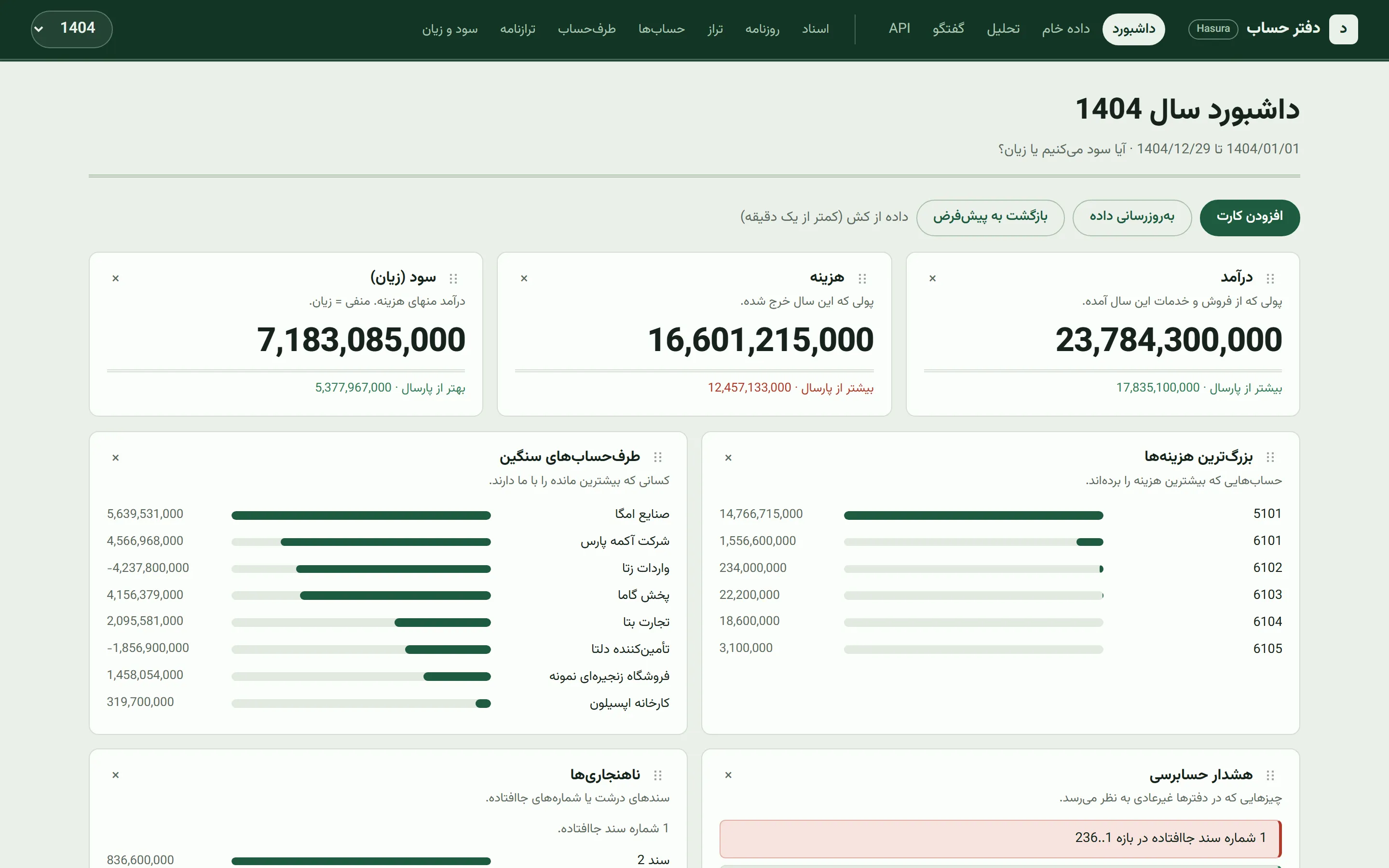
Ask your ledger questions in Persian and get audited numbers back. A read-only accounting dashboard plus an LLM tool-calling SQL agent over an ERP warehouse.
A read-only, Persian (RTL) accounting dashboard and LLM tool-calling SQL agent over an ERP warehouse. Ask questions in Persian; the model answers from a pre-computed “digest pack” of the fiscal year and only falls back to SQL when a number is not in the pack.
Highlights
- Tool-calling SQL agent with guardrails: one
run_sqltool, SELECT-only, forbidden-keyword check, forcedLIMIT, and a forced written summary after a few rounds. - Digest-pack context: the whole fiscal year (trial balance, P&L, parties, vouchers) is condensed once, so most answers need zero SQL.
- Natural-language dashboard cards: type a Persian request, the LLM compiles it once to a JSON spec with read-only SQL; refreshes never call the model again.
- Real accounting semantics: closing/opening vouchers and memo accounts excluded from turnover, year-over-year comparison, numbering gaps, draft vouchers and duplicate parties flagged.
- Persian-first UI: RTL layout, Jalali dates, light and dark themes, drag-to-reorder board, works on a phone.
- Runs without Docker: a synthetic two-year ledger and a small Hasura stand-in let you click through every screen locally.
Screenshots
All screenshots use the synthetic “Acme / آکمه” ledger from scripts/seed_mock.py (demo data). The chat answer is a scripted demo reply, not model output; it does make one real run_sql call against the demo ledger.
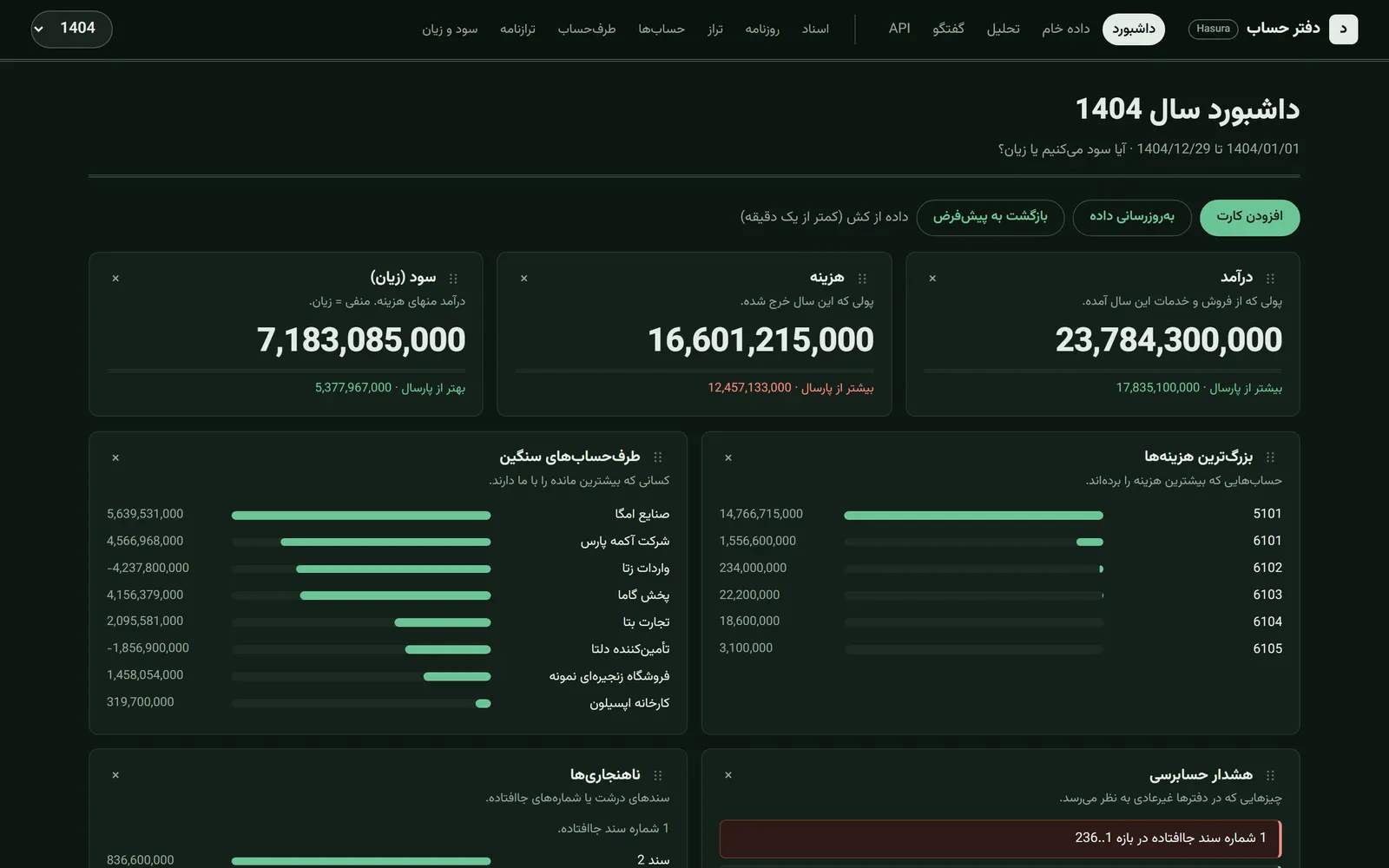 | 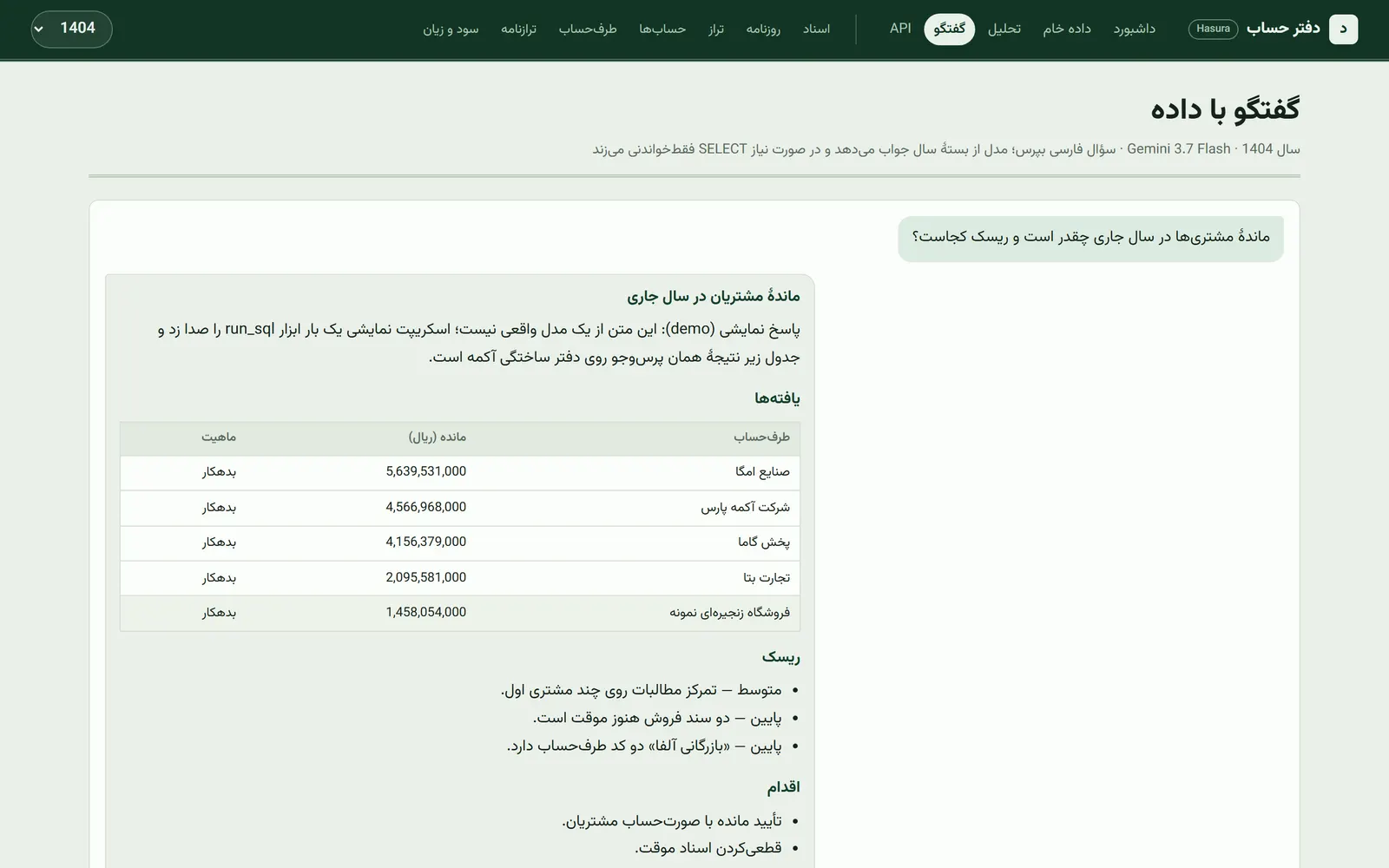 |
| Dashboard, dark theme (demo data) | Agent chat with one real run_sql tool call (demo data, scripted reply) |
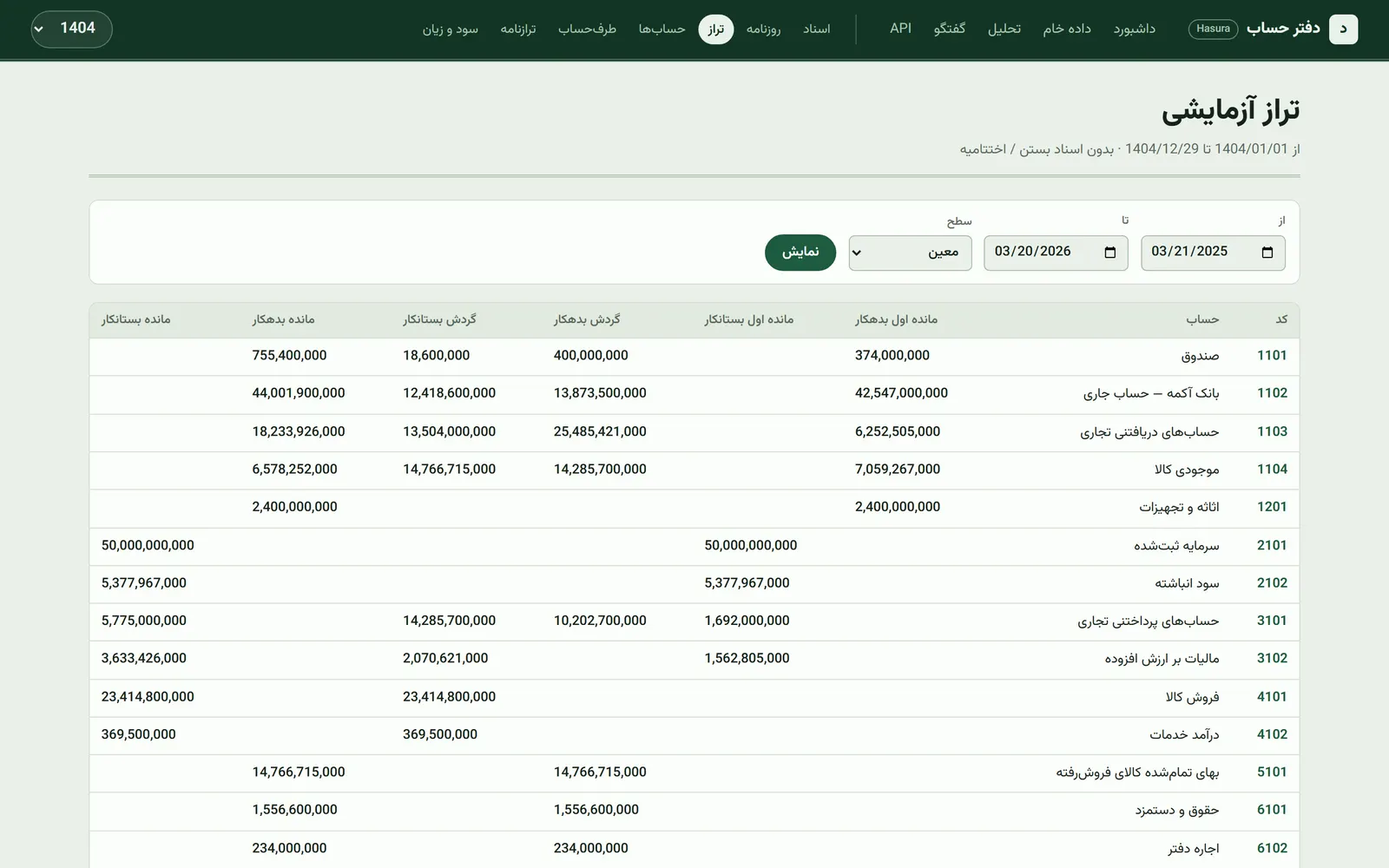 | 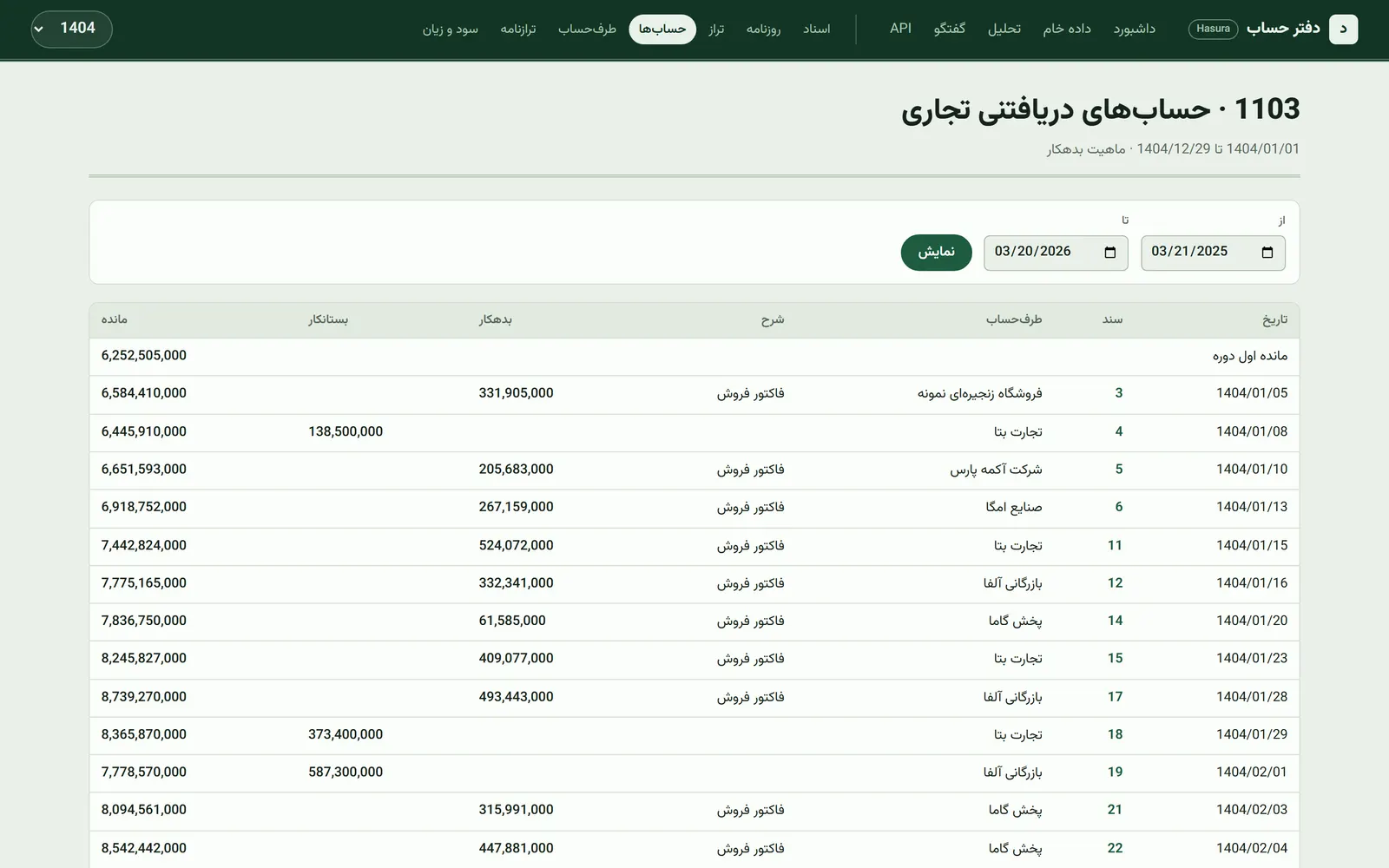 |
| Trial balance: opening, period, closing (demo data) | Account ledger with running balance (demo data) |
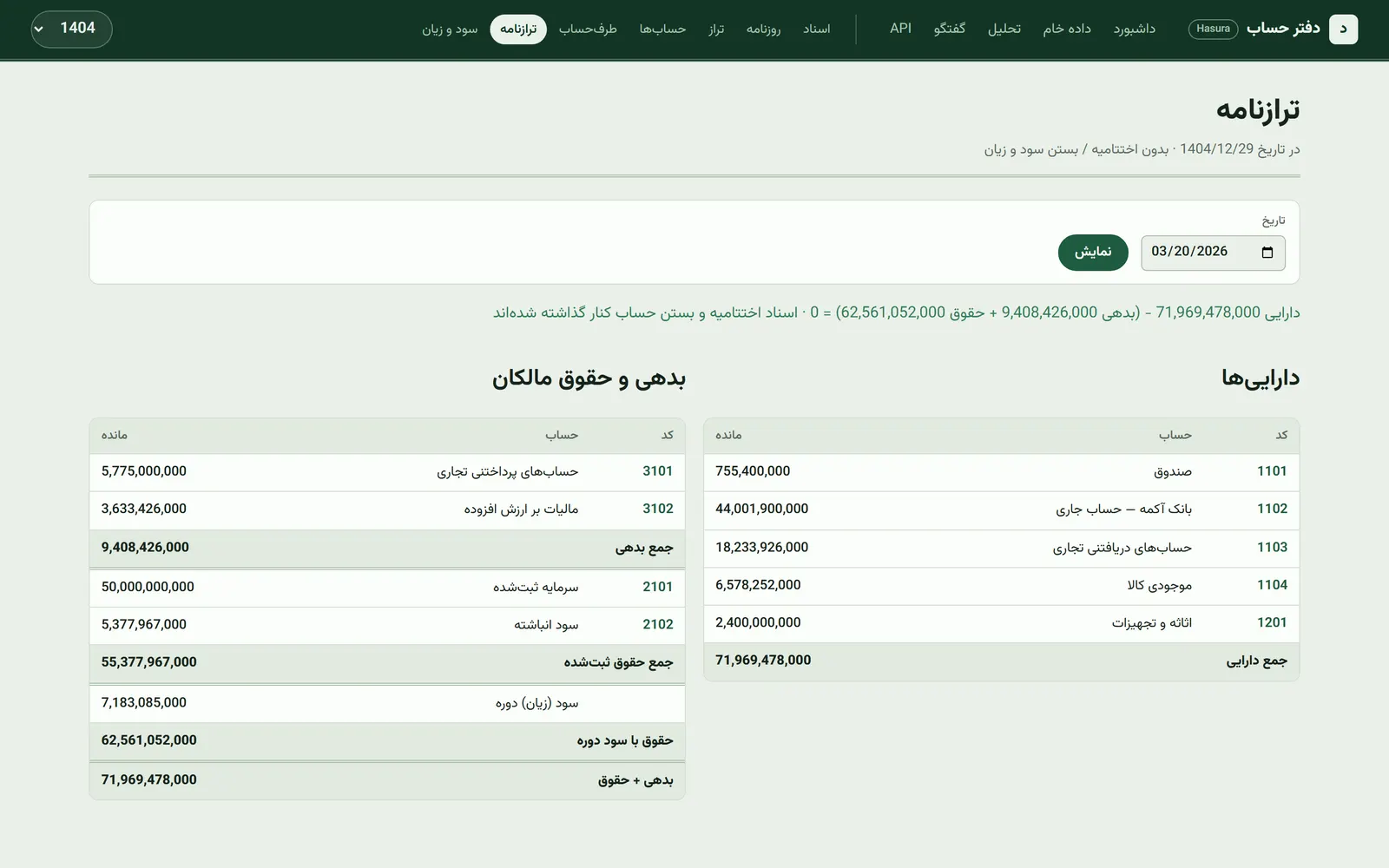 | 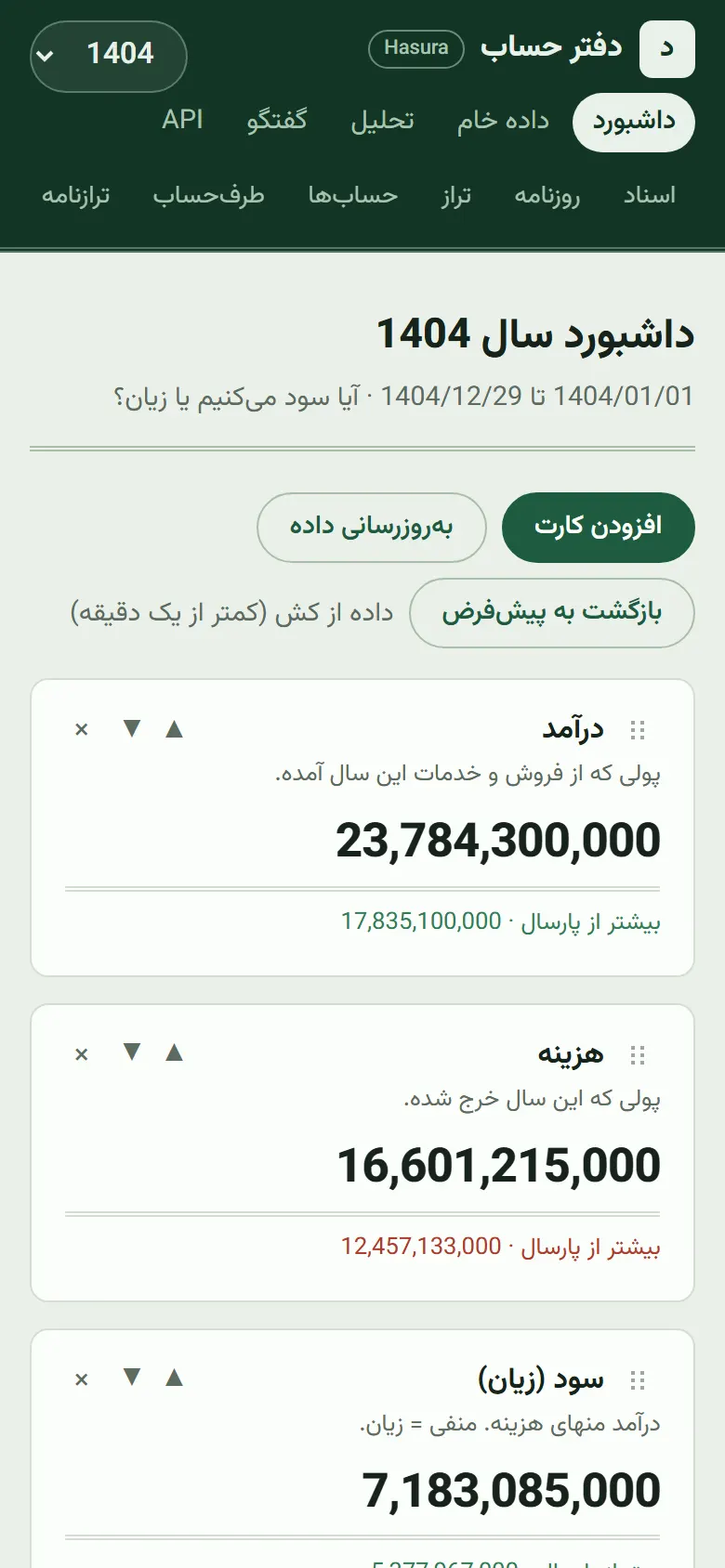 |
| Balance sheet with the accounting-equation check (demo data) | Dashboard on a 390 px phone (demo data) |
Why it’s interesting
- The LLM sees a compact digest pack of the year (trial balance, P&L, parties, voucher list, flags) built in
app/queries.py::digest, so most questions need zero SQL and cost less, with fewer hallucinated numbers. - Safe SQL tool: the model gets a single
run_sqltool. Statements are checked against a forbidden-keyword regex, must be SELECT, and get aLIMITforced (app/ai.py). After a few roundstool_choiceflips tononeto force a written summary instead of looping. - Natural-language dashboard cards: a manager types a Persian request, the model compiles it once into a JSON spec with read-only SQL (
:year_idis rebound on year change), and refreshes re-run the SQL without calling the LLM. - Accounting semantics are handled explicitly: closing/opening vouchers and memo accounts are excluded from operating turnover, opening balances are checked against prior-year close, and year flags (all-draft, missing numbers, duplicate party names) are surfaced.
- Persian-first UI and prompts; data lives in Hasura (Postgres + GraphQL), and the app is one client of it alongside a REST API (
/api/v1).
Architecture
flowchart LR
    BAK[(ERP SQL Server backup)] --> MSSQL[Docker SQL Server]
    MSSQL -- scripts/extract.py --> SQLITE[(data/erp.sqlite)]
    SQLITE -- scripts/push_hasura.py --> HASURA[Hasura + Postgres]
    HASURA --> APP[FastAPI app]
    APP --> UI[RTL HTML dashboard]
    APP --> REST[/api/v1/]
    APP <-- tool calling --> LLM[Gemini via OpenRouter]
    APP -. digest pack + run_sql .-> HASURA
A one-shot ETL restores the backup, extracts the accounting and operational tables to SQLite, and pushes them into a Postgres schema tracked by Hasura. The FastAPI app only reads from Hasura; nothing is written back to the ERP. SQL Server is not needed after extraction.
Tech stack
Python 3.12, FastAPI, Jinja2, Hasura (GraphQL over Postgres), SQLite (intermediate archive), pymssql and Docker (SQL Server, ETL only), OpenRouter (Gemini Flash) with tool calling, persiantools for Jalali dates, pm2 example config.
Key techniques
- Tool-calling loop with read-only SQL guard and forced summary:
app/ai.py. - Digest-pack context building:
app/queries.py(digest). - One-shot custom-card compilation to a JSON spec:
CARD_SYSinapp/ai.py, endpoints/api/board/custom*inapp/main.py. - Reports over GraphQL and SQL (trial balance, ledgers, P&L, balance sheet, concentration, anomalies, year comparison):
app/queries.py,app/analysis.py. - In-process TTL cache for board APIs:
app/cache.py. - ERP-to-SQLite mapping and Hasura provisioning (FKs, relationships, tracking):
scripts/map.py,scripts/extract.py,scripts/push_hasura.py.
Getting started
No real data is included. Use the synthetic mock ledger (“Acme Co.”) or restore your own backup.
Demo mode (no Docker, no API key)
scripts/demo_hasura.py is a small stand-in for Hasura that serves the SQLite file directly: the GraphQL subset the app uses plus run_sql (run by SQLite with a couple of Postgres-to-SQLite rewrites). With DEMO_LLM=1 it also answers the chat endpoint with a scripted, clearly labeled demo reply that makes one real run_sql tool call. It is for demos only, not a Hasura replacement.
uv sync
uv run python scripts/seed_mock.py                                   # synthetic 2-year ledger -> data/erp.sqlite
DEMO_LLM=1 uv run --with graphql-core python scripts/demo_hasura.py --port 8080
# second terminal
HASURA_URL=http://127.0.0.1:8080 HASURA_ADMIN_SECRET=demo OPENROUTER_API_KEY=demo OPENROUTER_URL=http://127.0.0.1:8080/api/v1/chat/completions uv run python -m uvicorn app.main:app --host 127.0.0.1 --port 8002
Screenshots are captured with node scripts/capture-screenshots.cjs http://127.0.0.1:8002 (needs Playwright installed).
With Hasura
cp .env.example .env          # set HASURA_URL, HASURA_ADMIN_SECRET, OPENROUTER_API_KEY (optional: OPENROUTER_URL)
uv sync
Mock mode (needs a running Hasura with a Postgres database):
uv run python scripts/seed_mock.py        # writes data/erp.sqlite
# run push_hasura.py without scripts/ on sys.path (it would shadow stdlib `inspect`)
uv run python -c "import importlib.util as u; s=u.spec_from_file_location('p','scripts/push_hasura.py'); m=u.module_from_spec(s); s.loader.exec_module(m); m.main()"
uv run python -m uvicorn app.main:app --host 127.0.0.1 --port 8002
Real data: place the backup at erp_backup.bak, then docker compose up -d, python scripts/restore.py (set BAK_LOGICAL_DATA / BAK_LOGICAL_LOG from RESTORE FILELISTONLY), python scripts/extract.py, and push as above. The extractor targets one specific ERP schema (see docs/schema.md); other ERPs need a new mapping in scripts/map.py and scripts/extract.py.
Open http://127.0.0.1:8002 (UI), /api/v1 (REST catalog), /docs (Swagger), /flow (data-flow diagram, docs/data-flow.html).
Tests
There is no automated test suite yet. scripts/seed_mock.py asserts every synthetic voucher balances. scripts/audit_data.py runs data-consistency checks over the extracted SQLite (balanced vouchers, continuity between years) and writes docs/data-audit.json (git-ignored).
License
MIT
Built by Sepehr Radmard · LinkedIn · GitHub · more projects on my profile